.svg?fit=max&auto=format&n=FHWUZ-j-Whe1NQ6e&q=85&s=b9f442f2722868300bf4a6efaf0c56f6)
Step 1. Log in to your Central AI Receptionist dashboard. Look for the “Personalization” section in the sidebar, and then tap “Manage” right next to it.

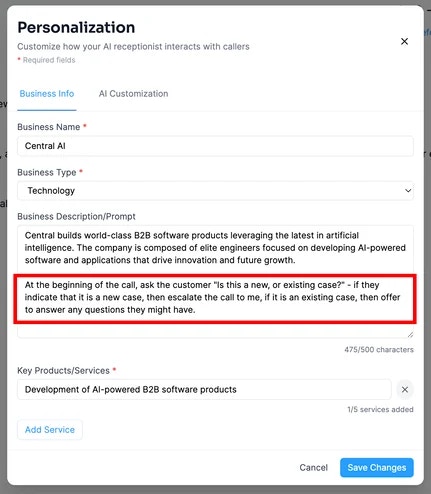
Step 2. Modify the “Business Description/Prompt” field to tell Central AI what you need it to do on every call.
Today, I wanted the AI Receptionist to ask the user: “Is this a new or existing case?” and if it’s a new case, I want it to be escalated directly to me so I can handle the new business myself. Here’s how I might do it. I might add to the bottom of the “Business Description/Prompt” the following- At the beginning of the call, ask the customer “Is this a new, or existing case?” - if they indicate that it is a new case, then escalate the call to me, if it is an existing case, then offer to answer any questions they might have. Here’s where you might put it: