.svg?fit=max&auto=format&n=FHWUZ-j-Whe1NQ6e&q=85&s=b9f442f2722868300bf4a6efaf0c56f6)
What is Warm Transfer?
With the Central AI Receptionist, Warm Transfer is a feature that passes along context to a human who may be required for escalation or call routing. For example, if a caller asks to speak to a person on your team, Central’s AI receptionist will first call the person it’s about to hand off to, explain the issue with a quick summary, and then ask if they would like to be connected to the caller. If you’re a busy small business owner, team leader, or exec, this feature is a great way to save time, ensuring you only take the highest value calls.Warm Transfer: On or Off?
When Warm Transfer is ON: Whenever the AI Receptionist is looking to escalate phone calls, it will first call the contact it’s about to escalate to, provide a quick summary, and ask if you would like to be connected to the caller. If you indicate YES, you will be connected to the caller, and the AI Receptionist will stop talking. If you indicate NO, it will let the caller know that no one is available to take their call. When Warm Transfer is OFF: Whenever the AI Receptionist is looking to escalate phone calls, it will call you directly, and when you pick up, it will be the caller directly connecting to you. If you don’t pick up, it will let the caller know that no one is available to take their call. By default, Warm Transfer is turned off.Turning Warm Transfer On
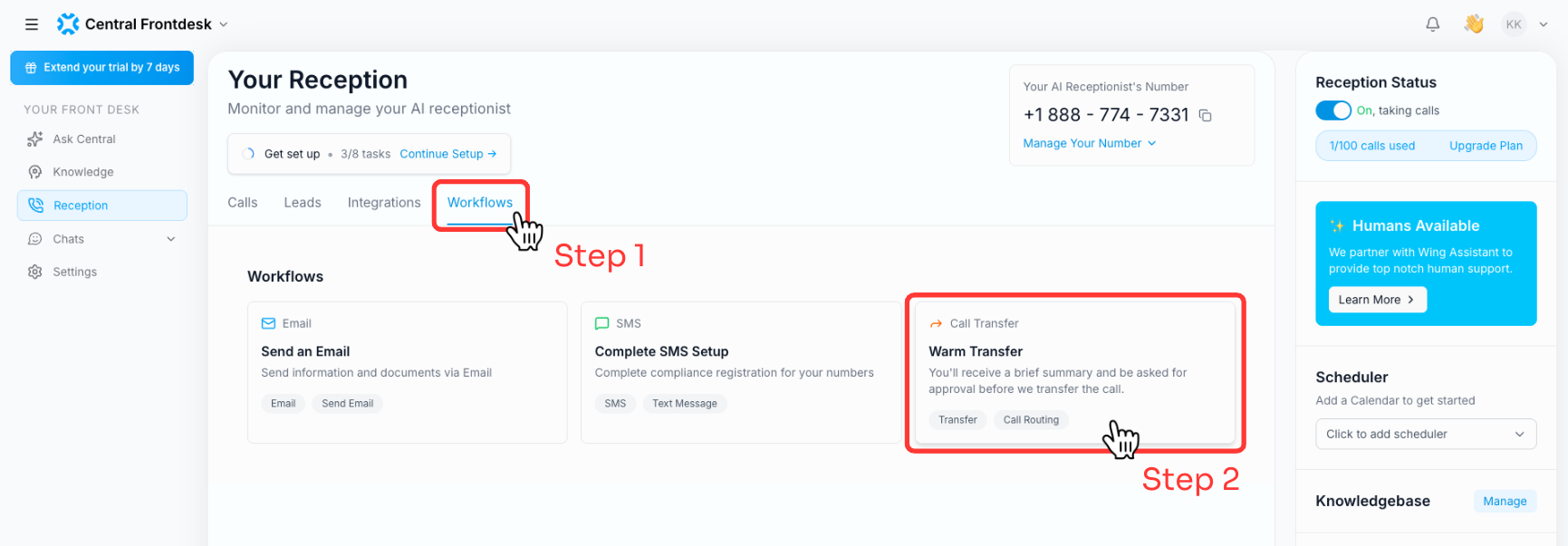
Turning Warm Transfer on is simple. Navigate to the Reception Dashboard, and tap on “Workflows” (see Step 1 in the below image) and then tap on “Warm Transfer” (see Step 2 in the below image)